Adobe Marketo Engage: how smart campaigns and programs actually fit together
Adobe Marketo Engage: how smart campaigns and programs actually fit together
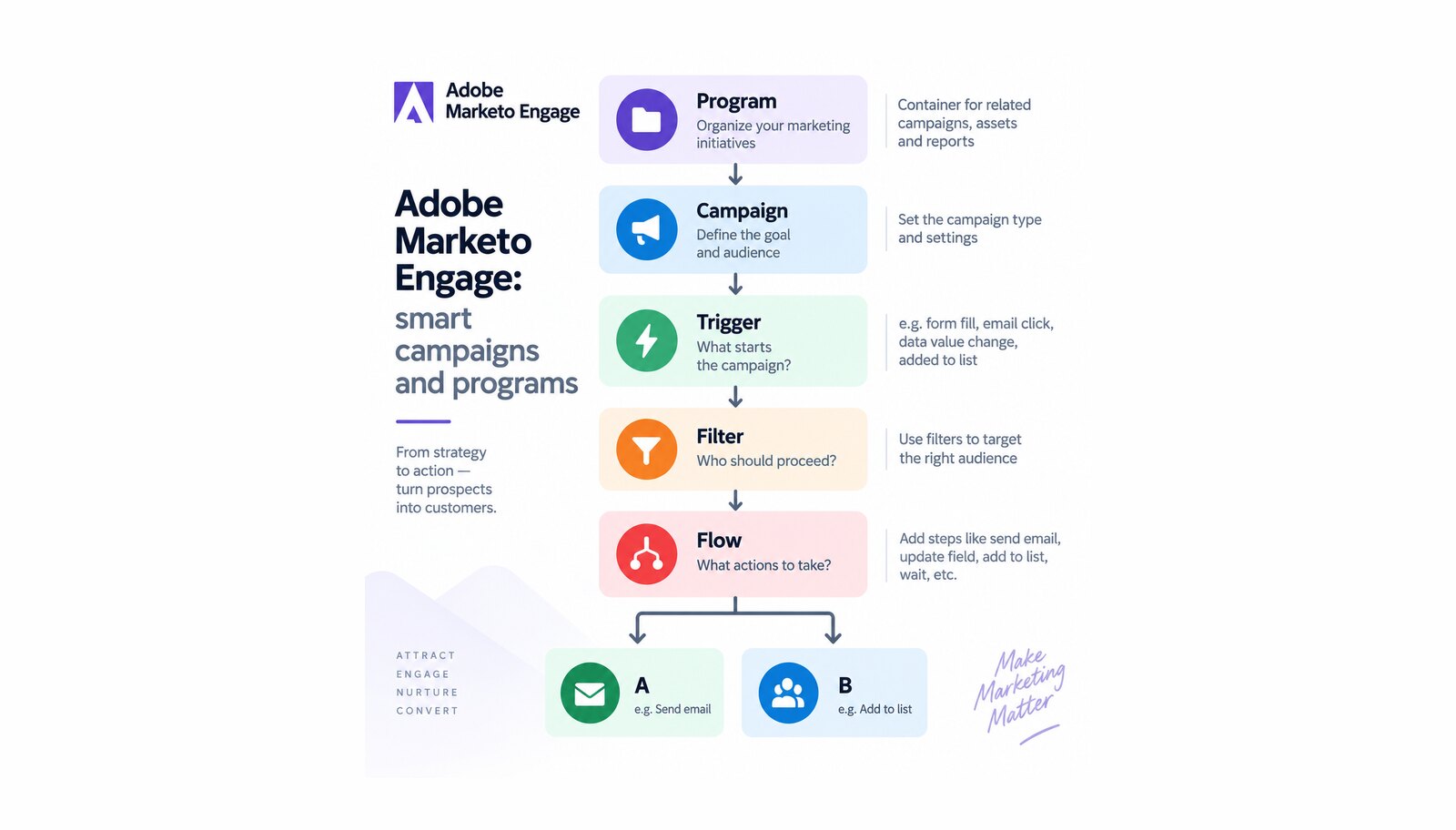
Marketing automation projects rarely fail on features. They fail on small structural decisions nobody made deliberately, and reveal it a year later when a campaign sends twice, or never sends, and no report explains which initiative produced the pipeline.
Two objects in Adobe Marketo Engage carry almost all of that weight. The smart campaign does the work; Adobe’s metaphor for it is blunt — "If Marketo Engage is a car, the Smart Campaign is its engine." The program is what the campaign lives inside, and what makes its results countable.
Table of contents
- What is a smart campaign in Adobe Marketo Engage?
- Batch or trigger: the mode you do not set directly
- Programs: the container that makes reporting possible
- Qualification rules, or why the campaign only ran once
- Integration across Adobe Experience Cloud
- The role of AI: Coworker for Marketo Engage
- What to plan for: entitlements, terms and edits that break things
- Conclusion: why campaigns and programs are one design
What is a smart campaign in Adobe Marketo Engage?
Adobe calls smart campaigns "the most important tool in Marketo Engage", capable of triggering "on one person and perform actions, or rollup millions of people and run a series of flow steps." That range is the point.
The who is a smart list, which accepts two kinds of rule. A filter collects "all of the people in a batch that qualify at the present time." A trigger does something else: "the moment someone does something, fire the flow immediately." By default people satisfying all the smart list rules qualify, and that can be changed — worth knowing before anyone concludes the audience is broken.
Batch or trigger: the mode you do not set directly
This distinction decides most campaign behavior, and it is not a switch you throw. Adobe states it plainly: "If a Smart Campaign uses at least one trigger within the Smart List section, the mode will automatically be set to triggered."
The two differ in every way that matters. A batch campaign "launches at a specific time and affects a specific set of people all at once", holds only filters, and can recur daily, weekly or monthly. A trigger campaign "affects one person at a time based on a triggered event." Mix them and triggers decide when while filters decide whether: only people satisfying the filters go through, and any one trigger is enough.
Programs: the container that makes reporting possible
A program is not a folder. It is the unit Marketo Engage counts things in, and the definition is narrow: "A member is a person that has a status in a program." Membership is therefore stored on the record, while a smart list is a query evaluated when it runs. Those two get confused constantly, which is why membership numbers and audience counts refuse to reconcile.
People become members in a defined set of ways: a form belonging to the program, an import, a status-changing flow step, registration for or attendance at a synced webinar, the event check-in application, or a synced CRM campaign. Email programs are stricter — "a person is added to membership only when the email is sent."
- Channels and statuses. "Program statuses are the steps people go through in a program", Adobe writes, "defined by the channel." That makes the channel a governance decision, not a label: it fixes the vocabulary of progress for every program using it, and which status counts as success. Progression is one-directional — "A person cannot move backwards to an earlier program status."
- Period costs. Cost lives on the program too, as a period cost — "the money you spend in a specific month on a program" — which program performance reporting totals. Plan for the gap-filling rule: months with no defined period cost roll backwards to the last month that had one, so a cost entered in the wrong month silently reattributes spend.
Qualification rules, or why the campaign only ran once
Sooner or later somebody reports that a campaign stopped working for a person who obviously qualified. Usually it did what it was told. Qualification rules "control how many times someone can run through the flow in a Smart Campaign", and the default is conservative: "even if someone triggers a Smart Campaign multiple times, they will only be sent through the flow once."
That can be changed to every time, or once every so many days, weeks or months. Two details save arguments later: a monthly interval is always counted as 30 days, and communication limits are not applied to smart campaigns by default.
Integration across Adobe Experience Cloud
Programs are also where Marketo Engage meets the rest of your stack: a synced CRM campaign can add members directly, so an initiative run by sales and one run by marketing report into the same container — worth designing rather than discovering, and part of what we set up on an Adobe Marketo Engage engagement. Where AI capability has to be planned across several Adobe applications at once, each with its own entitlement conditions, we scope it through our Adobe AI services.
The role of AI: Coworker for Marketo Engage
Marketo Engage has a native agentic capability, Coworker for Marketo Engage, which Adobe describes as automating "select workflows through natural-language interaction". Adobe notes it "was formerly known as Marketo AI" and warns that the permission and role names have not caught up yet.
Availability is stated openly — "This feature is available to all subscriptions" — with two real gates on top. You must agree to Adobe’s core generative AI terms and the supplemental terms before it will run, and access comes through a role-level permission not enabled by default for every role.
The skills Adobe documents without a restricted-availability notice are narrow and useful: explaining why a specific person did not reach a milestone, auditing a program against best practices across its emails, landing pages and campaigns, answering product questions from official Adobe documentation, and importing and deduplicating a list with field-mapping help.
What to plan for: entitlements, terms and edits that break things
Three constraints shape how this is operated:
- The program schedule builds batch campaigns only. "Only Batch Campaigns can be created in this view. Trigger Campaigns are not supported." If your team plans work from the program calendar, event-driven automation lives elsewhere.
- The calendar does not show everything. Batch campaigns appear on the program schedule, but "anything after a ‘Wait’ step within the Smart Campaign will not be included on the view." A delayed follow-up is invisible where people look for it.
- Editing a live campaign is risky by design. Adobe warns that changing smart list or flow-step logic on an active campaign "can potentially break its functionality."
Add the AI conditions above, and you have the short list to settle before anyone is promised a capability.
Conclusion: why campaigns and programs are one design
The smart campaign and the program answer different questions. The campaign decides what happens to a person and when. The program decides what the business can say about it afterwards: which channel, which statuses, which success definition, whose budget. Neither is fixable retroactively.
That is why naming, channel design, status vocabulary and campaign conventions are the first deliverable of an Adobe Marketo Engage engagement, not documentation written afterwards.
Unlock the power of Adobe Solution with Softwhale.
Unlock the power of Adobe Solution with Softwhale.
Explore how Softwhale’s expert Adobe solutions can help you build scalable and personalized digital experiences. Dive deeper into insights and best practices tailored specifically to your industry. Stay informed with our latest blog posts on Adobe trends, strategies, and innovations.