XDM schemas and Identity Service: why one customer becomes one profile, or three
XDM schemas and Identity Service: why one customer becomes one profile, or three
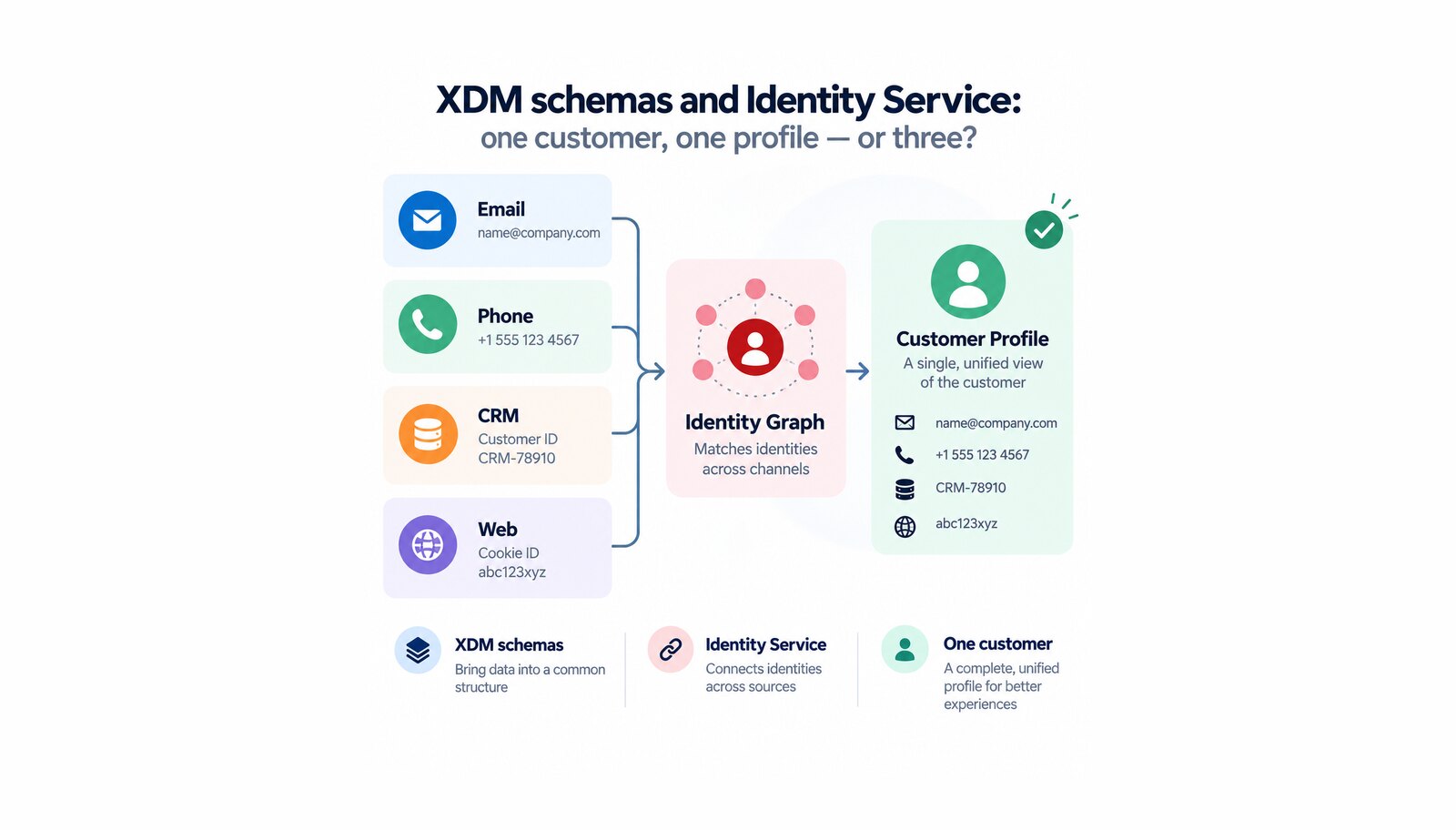
Ask a marketing team how many customers they have and you get a number. Ask three systems the same question and you get three numbers, all wrong. The CRM knows a person by account ID, the website knows a browser by cookie, the mobile app knows a device — and unless something joins them deliberately, the same human being is counted three times, emailed three times, and personalized to as though the last six months never happened.
That joining is what Adobe Experience Platform Identity Service does, and the quality of the result is decided earlier than most teams expect: in the data model. Experience Data Model schemas are where you declare what a record is and which of its fields identify a person. Those declarations are cheap to make and expensive to revise, which is why they deserve a conversation rather than a default.
Table of contents
- What is an XDM schema, and what is Identity Service?
- Why identity decisions outlive every other decision
- What makes a schema usable for personalization
- Integration across Adobe Experience Cloud
- What to plan for: what hardens, and what breaks
- Conclusion: why the identity layer comes first
What is an XDM schema, and what is Identity Service?
Adobe states schema composition as a formula: a class plus schema field groups equals an XDM schema, where a schema is composed of a class and zero or more field groups. The class comes first, and it carries two consequences. It sets the behavioral aspect of the data — record or time-series — and it determines which field groups are even eligible for that schema.
The record-versus-time-series distinction is worth translating out of Adobe’s vocabulary, because it is a business question in technical clothing: record data is what a person is, time-series data is what a person did. A customer export is the first. A page view is the second. Two of Adobe’s standard classes — XDM Individual Profile and XDM ExperienceEvent — are required for nearly all downstream Experience Platform processes, which tells you how central the distinction is.
Identity Service is the layer above that. Field groups add the actual fields, and among them you mark the ones that identify a person, each with a namespace — the vocabulary that says this is a CRM ID, not just this is a string. Identity Service reads those marks and builds a graph of who is who.
Why identity decisions outlive every other decision
Adobe’s constraints on identity fields look technical and are commercial. Only string fields can be used as identities, identities are recognized only in record and time-series data, and — the one that gets argued about — only fields carrying personally identifiable information should be marked as identity, because choosing a field representing more generic data results in less precise relationships and potentially errors accessing related identities from the graph.
In practice this rules out the fields that look identifying and are not. A postal code or an IP address will happily join strangers who share a city. The candidates Adobe names as working are the unglamorous ones: primary keys from your relational tables, customer email addresses, phone numbers, account IDs, and the Experience Cloud ID.
There is also a rule about how many person identifiers an event may carry. Authenticated events must always contain a single person identifier. Two of them risks collapsing unrelated people into one graph; none at all means both authenticated and unauthenticated activity is stored against the Experience Cloud ID — which identifies a device, not a person. Everything a marketer later does with a customer profile depends on that decision being taken once, before the first dataflow runs.
What makes a schema usable for personalization
A schema can carry several identity fields, but Real-Time Customer Profile admits it only on one of two conditions — and Profile is the merged view behind Adobe Real-Time Customer Data Platform, audience building, and activation. Adobe states it most precisely where it documents the union validation error: to take part in the union, a schema must either promote one field to primary identity or carry an identity map field group instead — one of the two, not neither. Adobe’s general guidance names only the first. Promotion is not a property of the field: it is a separate identity descriptor on the schema, listed and reviewed on its own.
Identity Service does not distinguish between primary and secondary identity — as long as a field is marked as an identity, it is ingested — so every mark you make is a real edge in the graph rather than documentation. And for experience events the primary identity is decided by namespace priority, a numerical value expressing the relative importance of each namespace across your implementation. Priority is a governance decision that determines how customer data stitches together.
Integration across Adobe Experience Cloud
Everything downstream inherits this work. One profile built on one person identifier is what lets an audience mean what it says when activated, lets a journey address a person rather than a browser, and lets reporting in Customer Journey Analytics count people instead of sessions.
Adobe’s own application field groups take a shortcut worth knowing about: those for Adobe Analytics, Adobe Audience Manager, Adobe Campaign and Adobe Target assign a default primary identity automatically, and for Adobe Analytics that default is the Experience Cloud ID. Convenient when it matches your model, awkward when it does not. The identity graph viewer lets you check the result for a real person before volume makes this abstract.
What to plan for: what hardens, and what breaks
Schemas harden on first use. Experience Platform enforces a purely additive versioning principle: breaking changes are not supported once a schema has been used to create a dataset or enabled for Profile. Fields can be added and display names changed; previously defined fields cannot be removed, renamed or redefined. The window for restructuring is before ingestion, and it does not reopen.
A Profile-enabled schema cannot be switched off. Adobe’s own recommendation, if you no longer want one used, is to rename it to include Do Not Use or Inactive. Plan for the schemas you will regret.
A conflicting event is discarded whole. If an event carries two or more identities of the highest namespace priority — two different customer IDs, say — the entire event is rejected from ingestion as bad data. Not the field: the event.
Graphs have a ceiling. A graph holds up to 50 identities, and namespace priority stops affecting its behavior once that limit is reached. Shared devices, kiosks and test automation reach it faster than expected.
Conclusion: why the identity layer comes first
Data modeling is the least visible work in a customer data program and the most consequential. Audiences, journeys, personalization and reporting are all built on the assumption that Experience Platform knows who is who — and that assumption is either earned in the schema and the namespace priority order, or it quietly is not, which surfaces when a campaign addresses the same person three times.
Softwhale does this work with clients on Adobe Experience Platform: choosing the person identifier, deciding which fields deserve to be identities, setting namespace priority, and verifying the resulting graphs against real customers while the decisions are still cheap to change.
Unlock the power of Adobe Solution with Softwhale.
Unlock the power of Adobe Solution with Softwhale.
Explore how Softwhale’s expert Adobe solutions can help you build scalable and personalized digital experiences. Dive deeper into insights and best practices tailored specifically to your industry. Stay informed with our latest blog posts on Adobe trends, strategies, and innovations.